
Iconik Plugins

Delete Duplicate from Storage

The Delete Duplicate from Storage plugin allows users to clean up redundant original files from a given storage while preserving the first original copy of each asset. This plugin is typically run in conjunction with the Detect Duplicate Files plugin, which identifies duplicate files across storages and populates the necessary metadata to locate them.

Once duplicates are identified, this plugin can remove extra copies—saving storage space, streamlining asset management, and preventing unnecessary redundancy.
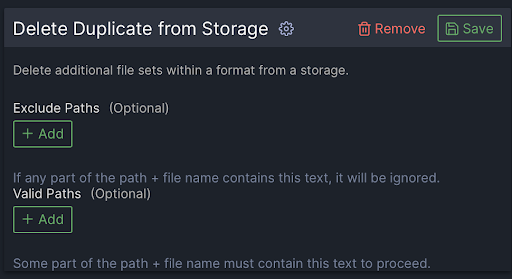
Delete Duplicate from Storage

Key Features:

  • Bulk Operation Support: Run the plugin on individual assets, entire collections, or saved searches for large-scale cleanup.
  • Preserves the First Original: Always retains the first original file path on the target storage. Only subsequent copies are removed.
  • Path Filtering:
    • Exclude Paths (Optional) : Skip deletion for any files whose path (combined with file name) includes one of the specified strings.
    • Valid Paths (Optional) : Only proceed with deletion if the path + file name includes one of the specified strings—adding an extra layer of precision and safety.
  • Format-Specific Cleanup: Works at the format level within each asset (e.g., only clears duplicate ORIGINAL formats on a given storage).
  • Safety-First Design: Designed to avoid accidental deletion by only acting on confirmed duplicates within the same storage.

Example Workflow:

  1. Detect: Use the Detect Duplicate Files plugin to populate metadata with file counts per storage.
  2. Search: Create a saved search to find all assets with more than one original on a specific storage.
  3. Run Cleanup: Apply the Delete Duplicate from Storage plugin to that saved search.
  4. Refine with Paths (Optional) : If needed, define valid paths (e.g., /proxy_sync/) or exclude paths (e.g., /do_not_delete/) to fine-tune deletion rules.

Example Use Cases:

  • Free Up SAN Storage: Regularly clear out redundant ORIGINAL files left behind from re-ingest processes or repeated transfers.
  • Post-Production Cleanup: After projects wrap, run bulk duplicate removal across archived project folders to eliminate extra copies and prep for long-term retention.
  • Workflow Automation: Integrate this with scheduled duplicate detection and saved search automation for hands-off cleanup across active productions.

Pricing

Upon Request

Buy Now
  • Implementation
  • Support (business hours)
  • Updates and feature upgrades