
The Auto Set Metadata plugin automatically applies or updates a metadata field for all assets matching a saved search. It runs every 10 minutes (or on a custom schedule) and is an extremely powerful tool for enforcing rules, automating labels, or enhancing asset governance inside iconik.
Iconik Plugins
Auto Set Metadata (Scheduled)
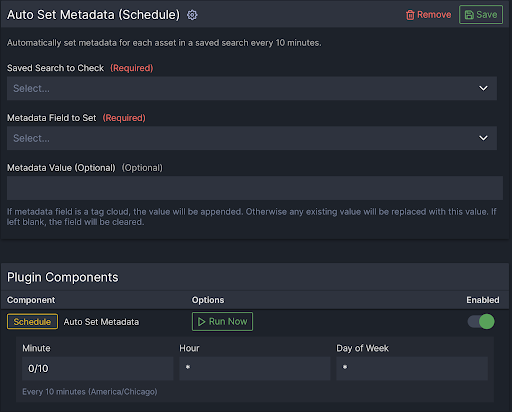
Key Features:
- Saved Search to Check (Required) : Define the asset set using any saved search — including advanced metadata filters such as metadata.rights_expiration_date:[* TO now-0d] to catch expired assets.
- Metadata Field to Set (Required) : Select which metadata field should be modified for matching assets.
- Metadata Value (Optional) : Set the desired value to apply. If this field is left blank, the plugin will clear the metadata field. If the field is a tag cloud, the new value will be appended.
- Runs Automatically: Executes every 10 minutes by default, or can be run manually with the Run Now button for immediate effect.
- Safe to Stack: Multiple instances of this plugin can be created on a domain, each targeting different fields, searches, or values.
Example Use Cases:
Rights Management
Automatically tag assets with EXPIRED in a rights_status field when they match a saved search like:
metadata.rights_expiration_date:[* TO now-0d]
This helps trigger additional workflows to restrict download, sharing, or publishing.
Compliance Warnings
Set a warning_banner metadata field to Contains Sensitive Content for assets tagged as Internal Use or located on specific secure SAN paths.
Editorial Prioritization
Apply Needs Review to assets uploaded from ingest folders like /incoming/ by using saved searches scoped by path or metadata values.
Localization Prep
Automatically flag assets with Requires Translation when they are tagged with language: Spanish but have a blank or missing subtitle metadata field.
Project Cleanup and Archival Prep
Identify old or stale assets and mark them as Archive Pending using this saved search query:
date_created:[* TO now-365d]
This metadata can then be used to trigger archive workflows or manual review.