
The Auto Archive Saved Search plugin enables automated archiving of iconik assets based on a saved search. It’s designed for long-term storage management and ensures your high-performance or primary storage stays optimized by moving qualifying assets to archive storage automatically.
Iconik Plugins
Auto Archive Saved Search
Key Features:
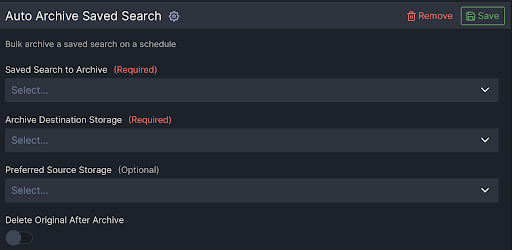
- Saved Search to Archive (Required) : Select a saved search that defines which assets will be archived. This allows automation based on metadata conditions such as age, project status, or tags.
- Archive Destination Storage (Required) : Choose the archive storage location where matching assets will be transferred.
- Preferred Source Storage (Optional) : Optionally restrict the archive operation to assets located in a specific source storage.
- Delete Original After Archive (Optional toggle) : Enable this option to delete the original file after it has been successfully archived—helpful for freeing up space on faster or more expensive storage.
- Scheduled Execution: The plugin runs on a recurring schedule, automatically checking for new assets that meet the criteria and executing the archive action.
- Path Selection Logic: If an asset exists in multiple storage locations, the plugin will select the first original path—the storage path where the asset was first ingested into iconik—for the archive job.
Usage Scenario:
Suppose you have a saved search that identifies all assets with the metadata tag “status: approved” and a creation date older than 12 months. You can configure the plugin to:
- Archive those assets to your deep cloud archive storage.
- Use the original ingest path if the asset exists in multiple locations.
- Optionally, delete the original from its source storage once the archive is complete.
This ensures archived content is preserved efficiently, without redundancy, and helps reduce storage costs over time.